
Prerequisite
Complete Exercise 7 before starting this exercise.
MTA deployment overview
MTA (Multi-Target Application) packages all modules — CAP app, HDI deployer, and AppRouter — into a single .mtar archive that Cloud Foundry deploys atomically.
Exercise 8 Bonus Homework - Deploy CAP with SAP HANA Cloud project as MTA
Note: This exercise cannot be performed during the CodeJam because we are using a shared BTP subaccount with limited resources. However, you can complete this exercise later in your own environment. If you do not have access to a corporate BTP account, you can sign up for a BTP trial account to try it out. Knowing how to deploy the final application with real security in a production environment is valuable as it ensures that your application is secure and scalable.
In this exercise, you will deploy your CAP project with SAP HANA Cloud as a Multi-Target Application (MTA) to SAP Business Technology Platform. This is the step that takes the app from a development-time prototype running locally in BAS into a fully secured, production-grade application accessible over the internet.
Source
These steps are from Deploy CAP with SAP HANA Cloud project as MTA on SAP Tutorials.
Project final adjustments and preparations
In this tutorial mission we've combined several different development types (HANA, CAP, Fiori) and wizards into a single project making it easy to develop and test locally. We just need a couple of more adjustments before we can deploy the complete application in a production ready format.
We will begin with the
xs-security.jsonfile. We need to make one adjustment to this file. Remember that we added theoauth2-configurationsection to allow authentication redirection from the SAP Business Application Studio testing. We want add a similar redirection allowance for when our application will be running from SAP BTP Cloud Foundry, environment. Add a line forhttps://*.hana.ondemand.com/**. Yourxs-security.jsonshould now look like this: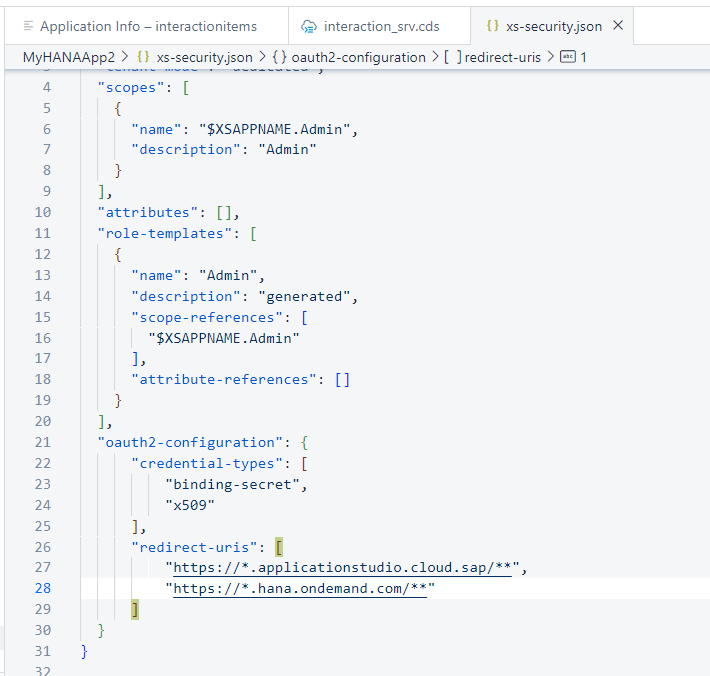
The other adjustment needs to be made in the
mta.yamlfile in the root of the project. This is the file that will control the build and deployment of the application.The adjustment we want to make is to the app router module section. The wizard added
default-env.jsonfile to the project so that we could test from the SAP Business Application Studio. However we don't want these files to be present in a "real" deployment, instead getting configuration from the bound service instances. Therefore we can tell the builder to exclude these files from this module making sure they aren't part of any productive deployment. That way we can keep these files in our project for future testing and development but ensure that they don't accidentally make it into a production deployment.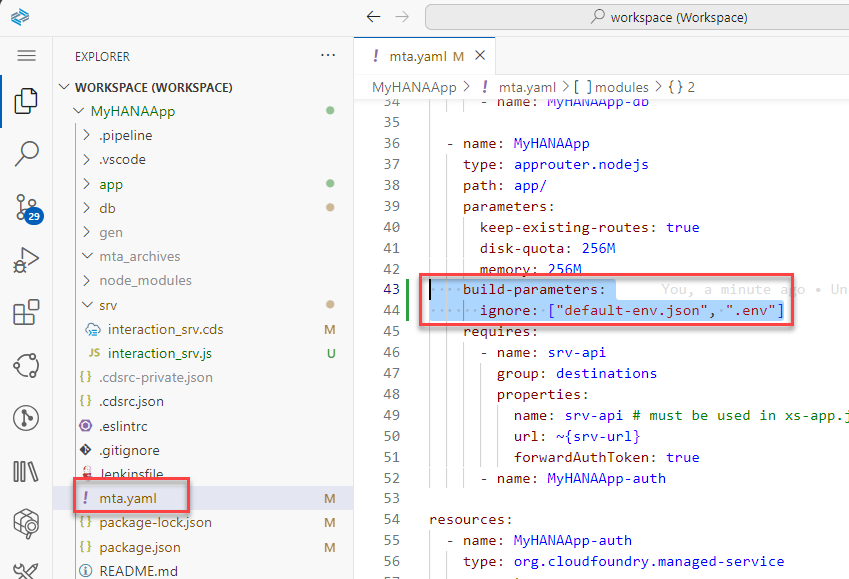
Use the Cloud MTA Build tool to package your project for deployment
Now that all of our project adjustments are complete, we can use the Cloud MTA Build tool to package the project for deployment.
Open a terminal window in SAP Business Application Studio and from the root folder of your project issue the command
mbt build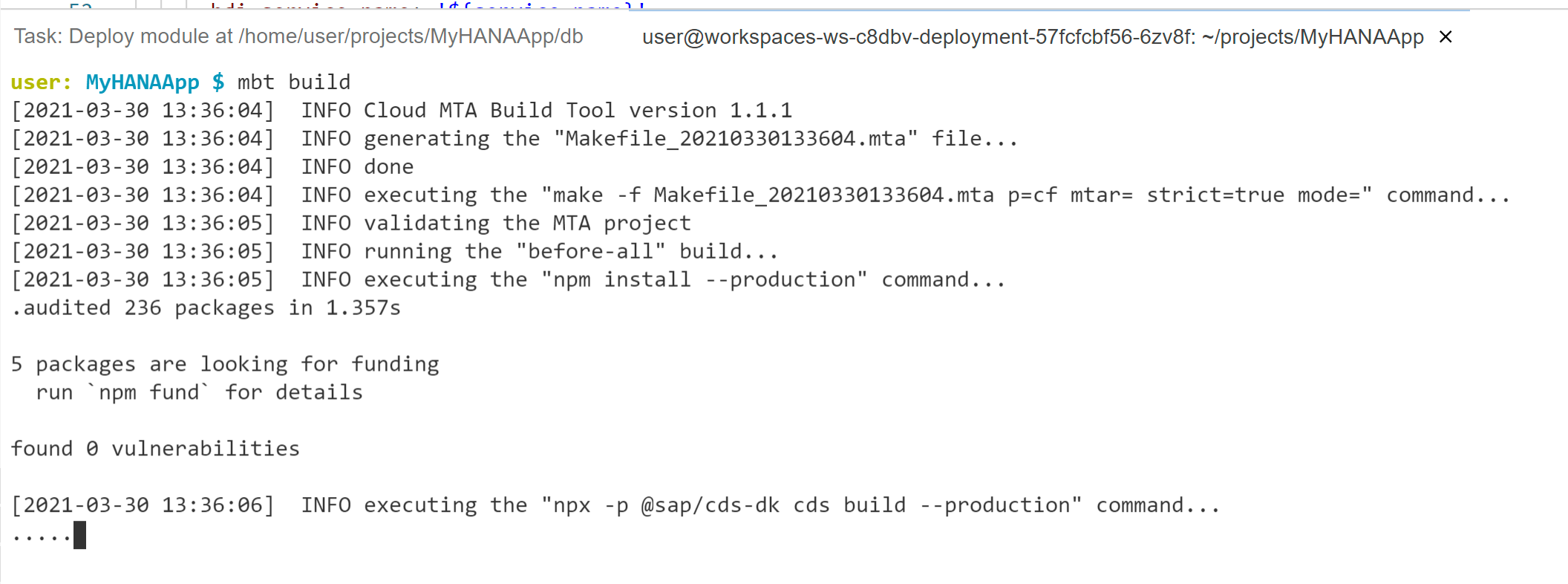
This will take several minutes as various build steps are performed (such as running npm install on each module) to prepare the project for deployment. The output of this command will be a zip archive with the extension
MTARin a new folder of your project namedmta_archives.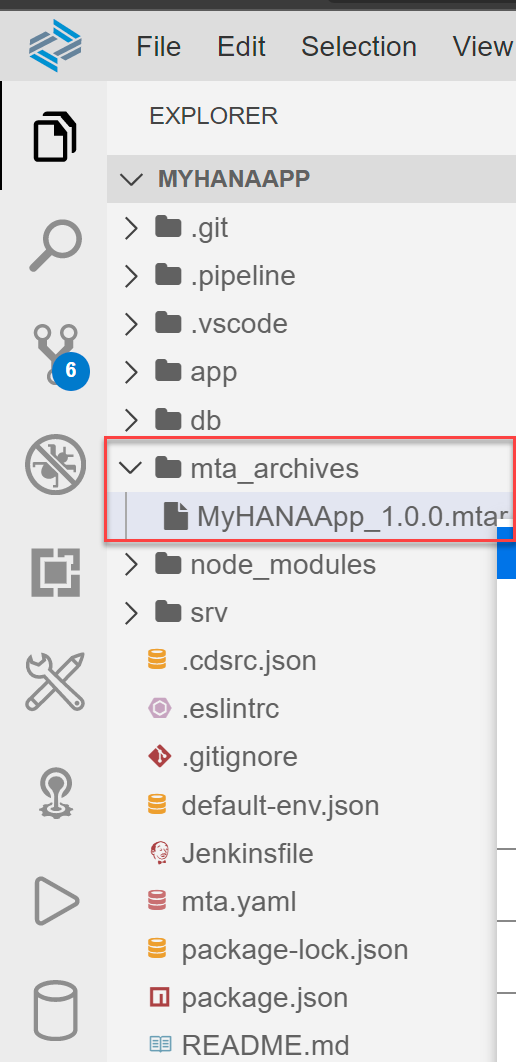
Not required as part of the deploy process, but it might be interesting to see what is inside this
MTARfile. You can download the file to your desktop and then open with an zip archive tool. In the root of the zip you will find folders (with zip files inside them) for the three modules we described in your mta.yaml file. Looking at the MTAR file in a zip utility is a good way to double check and make sure that your content is structured the way you wanted (and that your build-parameters exclusions worked) before attempting to deploy to Cloud Foundry.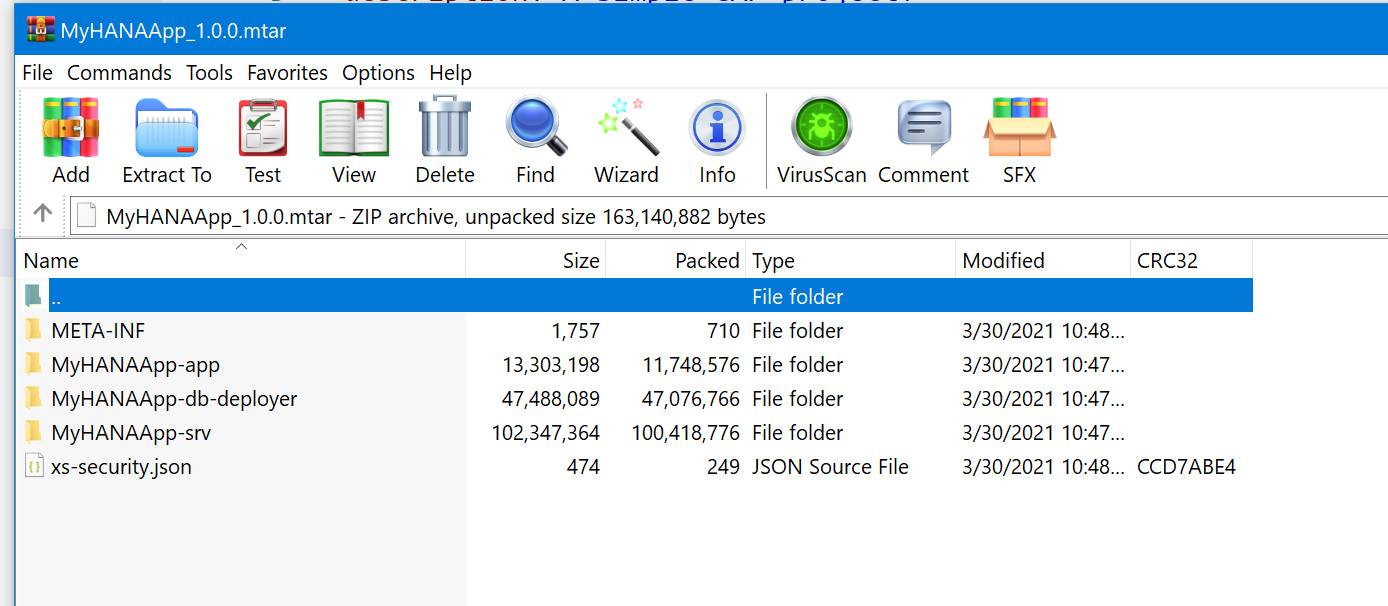
Deploy your application to SAP BTP, Cloud Foundry runtime
Now we are ready to deploy our entire project to SAP BTP, Cloud Foundry runtime. Although you can perform the deployment from the command line using the
cf deploycommand, you can also trigger it from the SAP Business Application Studio just by right mouse click on the MTAR file and choosing Deploy MTA Archive.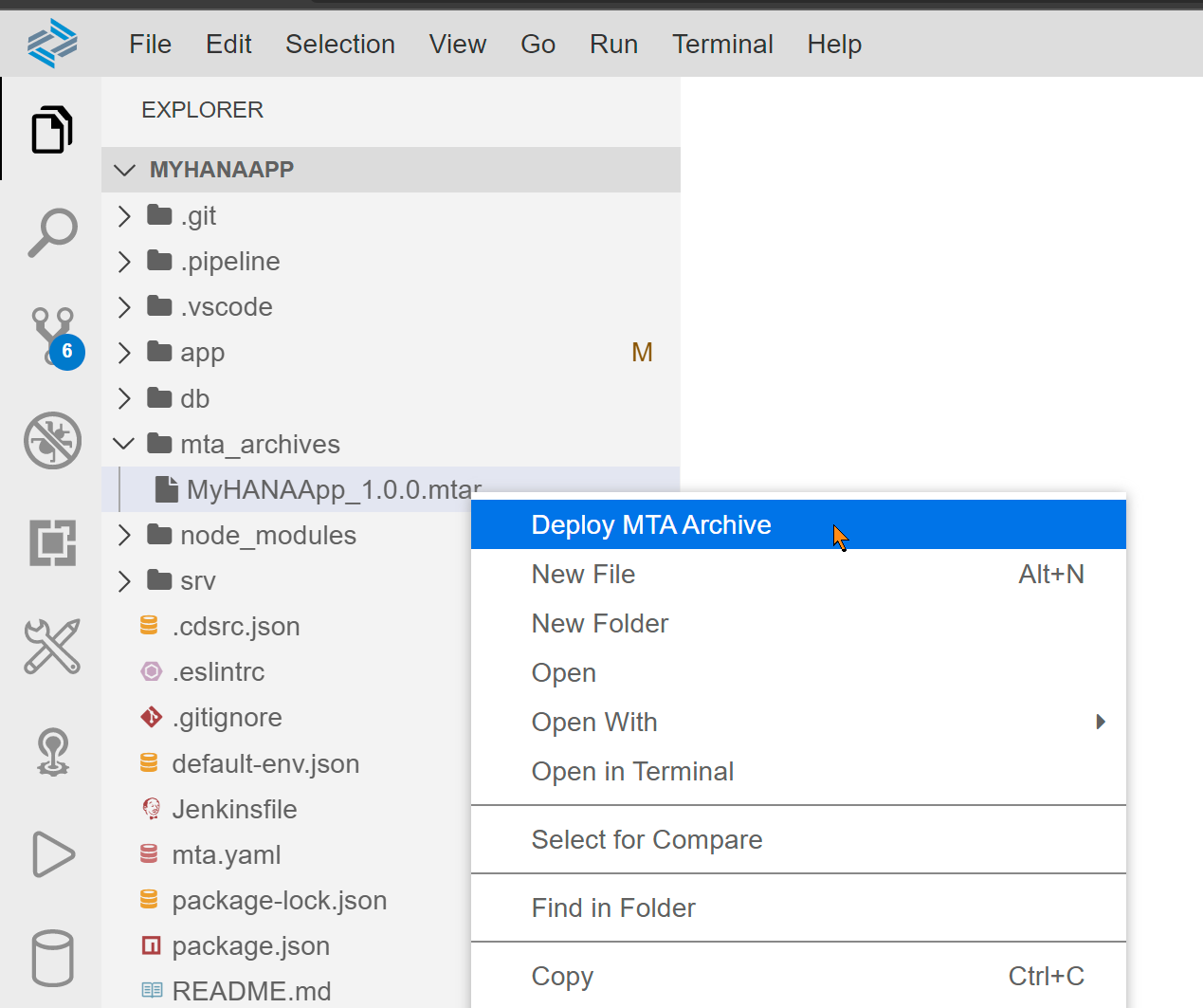
If you start the deploy and immediately receive this error don't be alarmed.
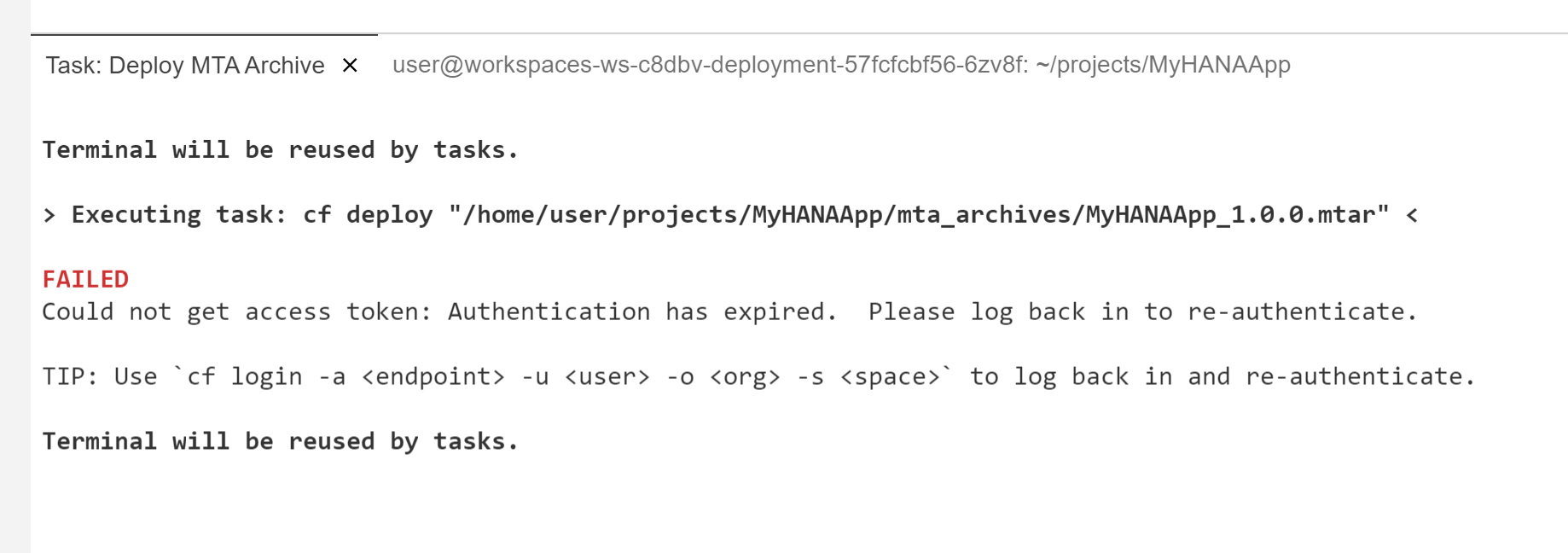
This just means that your login to Cloud Foundry has expired (which it does daily). From the Business Application Studio you can click on the Targeting CF section in the bottom bar or from any terminal window use the
cf logincommand to renew your login credentials. Then you can repeat the deployment.Otherwise your deploy should continue as normal. It will take several minutes to complete. You should see services being created from the resources section of the mta.yaml first then applications from the modules section of the mta.yaml.
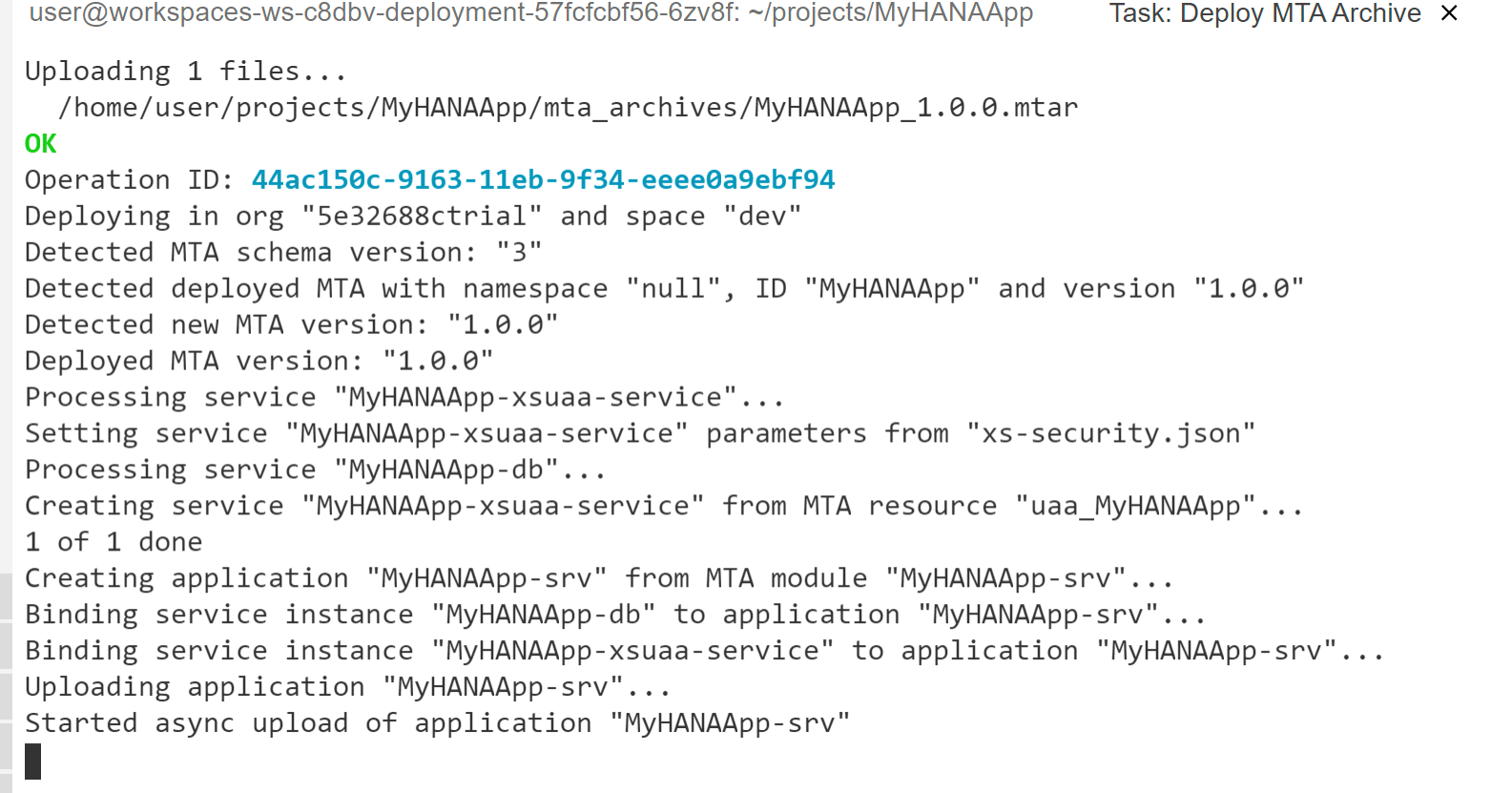
Upon successful completion of the MTAR deployment, you should be able to navigate to your space and applications in the SAP BTP Cockpit and see the three deployed applications. It is normal that the database deployer would be in a state of stopped. A deployer is an application that only needs to run upon deployment to send it's content somewhere (SAP HANA in this case). The application then shutdown and no longer consume resources.
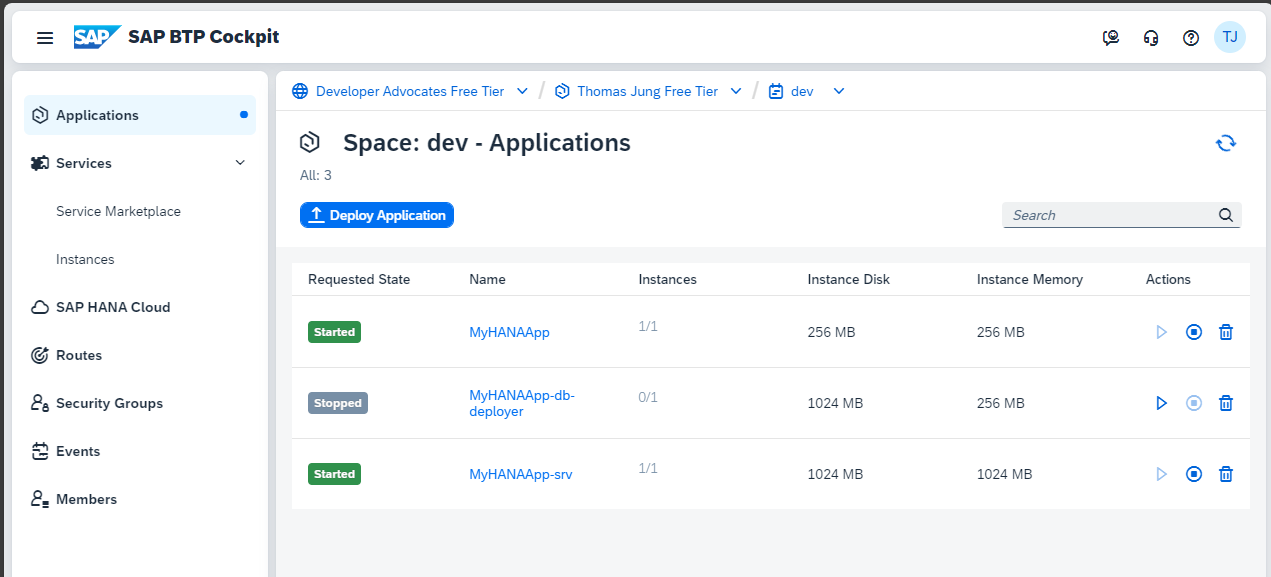
If either of other two application have bad requested state or their instances are not 1/1 then there may have been an error during deployment. If so continue to the next step where we will see how to view the Logs.
If you click on the name of the app, you will navigate to a detail screen for each application. From here you can access the URL for your application or view the Logs if there was some startup error.
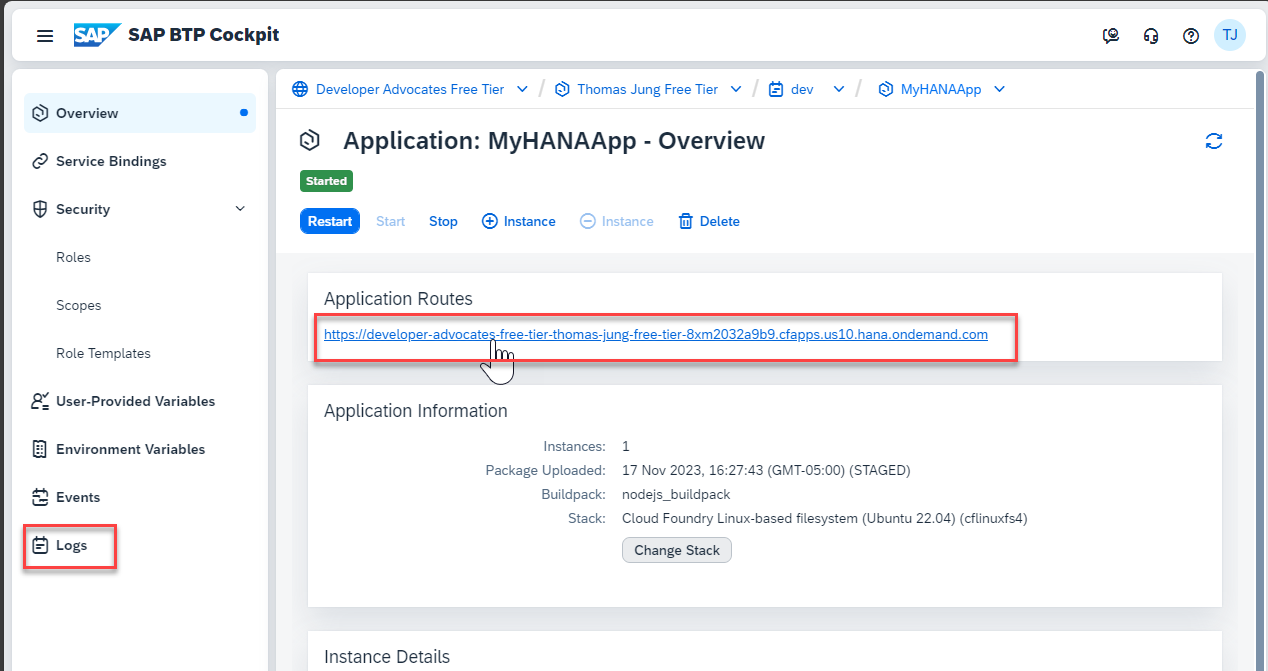
Remember to test via the Application Router as only that application will have the redirect to the Login Screen to generate the security token. But other than the different URLs everything should work the same as when we tested with authorization from the SAP Business Application Studio. Also because the database container was deployed to a new HDI container instance; you will need to return to the Database Explorer, connect to this new instance and load the data from CSV files. Will now have two copies of the same HDI container instance. One used for development and one deployed via the MTA that is used for testing. Often you would deploy these into separate spaces or even sub accounts, but to keep this tutorial easier we only use one of each of these and deploy into the same.
Background
What is an MTA?
A Multi-Target Application (MTA) is SAP BTP's packaging and deployment format for applications that span multiple Cloud Foundry modules and managed services. Instead of deploying each piece independently and manually wiring them together, you describe the entire application — its modules, their dependencies, and the services they consume — in a single mta.yaml descriptor file. The MTA toolchain then builds and deploys everything in the correct order with the correct bindings.
For a CAP + HANA Cloud application, the MTA graph looks like this:
┌─────────────────────────────────────────────────────────┐
│                    MTA: MyHANAApp                       │
│                                                         │
│  ┌──────────────┐    ┌──────────────┐                   │
│  │ MyHANAApp    │    │ MyHANAApp    │                   │
│  │ (AppRouter)  │───▶│ -srv (CAP)   │                   │
│  └──────────────┘    └──────┬───────┘                   │
│                             │                           │
│                      ┌──────▼───────┐                   │
│                      │ MyHANAApp    │                   │
│                      │ -db-deployer │ (runs once, stops) │
│                      └──────┬───────┘                   │
│                             │                           │
│  ┌──────────────┐    ┌──────▼───────┐                   │
│  │ MyHANAApp    │    │ MyHANAApp-db │                   │
│  │ -auth (XSUAA)│    │ (HDI container)│                 │
│  └──────────────┘    └──────────────┘                   │
└─────────────────────────────────────────────────────────┘
The three Cloud Foundry modules
The mta.yaml in this project defines three modules:
| Module | Type | Purpose |
|---|---|---|
MyHANAApp-srv | nodejs | The CAP Node.js service — serves OData endpoints, enforces authorization |
MyHANAApp-db-deployer | hdb | A one-shot HDI deployer — pushes the database artifacts into the HDI container, then stops |
MyHANAApp | approuter.nodejs | The SAP AppRouter — handles XSUAA login flows and proxies authenticated requests to the CAP service |
And two managed services:
| Service | Type | Purpose |
|---|---|---|
MyHANAApp-auth | xsuaa | Issues JWT tokens; defines the Admin scope referenced in @requires: 'Admin' in the CDS service definition |
MyHANAApp-db | hana (hdi-shared plan) | An HDI container on your HANA Cloud instance — stores all tables, views, and native artifacts |
Why the db-deployer stops after deployment
The MyHANAApp-db-deployer module exists solely to push the compiled HDI artifacts (gen/db) into the HDI container. It connects to MyHANAApp-db, runs the deployment, and then the process exits — which Cloud Foundry reports as a "Stopped" status. This is expected and correct behaviour. The deployer does not need to keep running because it has no incoming requests to serve; all database access at runtime goes through the CAP service layer.
The mta.yaml build pipeline
The before-all build hook runs two commands before any module is packaged:
build-parameters:
  before-all:
    - builder: custom
      commands:
        - npm ci
        - npx cds build --production
npx cds build --production compiles the CDS model and generates two output folders:
gen/srv— the production Node.js bundle forMyHANAApp-srvgen/db— the compiled HDI artifact set forMyHANAApp-db-deployer
The MBT tool then packages each generated folder into the MTAR archive according to the path: values in mta.yaml.
The security layer: XSUAA, AppRouter, and role assignments
In the earlier exercises, the CAP server ran without real authentication — the @requires: 'authenticated-user' and @requires: 'Admin' annotations were present in the CDS model but were not enforced because no XSUAA service was bound. Deploying as an MTA wires the real security chain:
xs-security.json— defines theAdminscope and a matching role template. Thexsappnamein this file must be unique within your BTP subaccount.- XSUAA service (
MyHANAApp-auth) — created fromxs-security.jsonby the MTA deployment. Issues JWT tokens that contain the scopes the user has been granted. - AppRouter (
MyHANAApp) — the front door. It redirects unauthenticated users to the XSUAA login page, obtains a JWT on their behalf, and forwards it in theAuthorizationheader of every request it proxies to the CAP service. - CAP service (
MyHANAApp-srv) — validates the JWT on every request and checks that the required scope (Admin) is present before allowing access to restricted entities.
The destination srv-api is the glue between AppRouter and CAP service. It is provided by MyHANAApp-srv in mta.yaml and consumed by the AppRouter module. At runtime, the AppRouter resolves the srv-api destination to the internal URL of the CAP service, which is never directly exposed to the internet.
# MyHANAApp-srv provides the destination
provides:
  - name: srv-api
    properties:
      srv-url: ${default-url}

# AppRouter consumes it
requires:
  - name: srv-api
    group: destinations
    properties:
      name: srv-api          # matches xs-app.json route destination
      url: ~{srv-url}
      forwardAuthToken: true # passes the XSUAA JWT to the CAP service
forwardAuthToken: true is critical — without it, the AppRouter would strip the JWT before forwarding, and the CAP service would reject every request as unauthenticated.
The role assignment step
After deployment, the Admin role template defined in xs-security.json must be assigned to a user before they can access the Admin-restricted endpoints. This is done in the BTP cockpit:
- Navigate to your subaccount → Security → Role Collections
- Create a new Role Collection (e.g.
MyHANAApp-Admin) - Edit the collection and add the
Adminrole from theMyHANAAppapplication - Assign the Role Collection to your BTP user under Security → Users
Without this step, authenticated users receive a valid JWT but it will not contain the Admin scope, and the CAP service will return 403 Forbidden on restricted endpoints.
Cloud MTA Build Tool (MBT)
The Cloud MTA Build Tool (mbt) is the command-line tool that reads mta.yaml, runs the before-all build commands, packages each module's output folder, and produces a single deployable .mtar archive file. The .mtar is a ZIP archive containing all module artifacts plus the MTA descriptor.
mbt build -p cf
# produces: mta_archives/MyHANAApp_1.0.0.mtar
The -p cf flag targets Cloud Foundry (as opposed to Neo, the legacy SAP BTP runtime).
Deploying the MTAR with the MultiApps CF CLI plugin
The cf deploy command from the MultiApps CF CLI plugin reads the .mtar file and orchestrates the full deployment:
- Uploads the archive to the CF MultiApps Controller
- Creates or updates managed services (
MyHANAApp-auth,MyHANAApp-db) - Deploys modules in dependency order (db-deployer before srv, srv before approuter)
- Binds each module to its required services
- Starts modules (db-deployer runs and stops; srv and approuter stay running)
cf deploy mta_archives/MyHANAApp_1.0.0.mtarYou can monitor progress with cf mta MyHANAApp and cf apps.
Summary
You have deployed a CAP + SAP HANA Cloud application as a fully secured MTA. The key takeaways are:
- The MTA descriptor (
mta.yaml) describes the entire application — modules, services, and their wiring — so the toolchain deploys everything consistently in one step - Three CF modules work together: the CAP service (
srv), a one-shot HDI deployer (db-deployer), and the AppRouter - The db-deployer stopping after deployment is expected — it is a run-once task, not a long-running service
- XSUAA + AppRouter + CAP form a three-layer security chain;
forwardAuthToken: trueinmta.yamlis the connector between AppRouter and CAP - After deployment you must manually assign the
Adminrole collection to users in the BTP cockpit before they can access restricted endpoints
Questions for Discussion
What is the Cloud MTA Build Tool?
Answer
The Cloud MTA Build Tool (MBT) is a command-line tool that reads
mta.yaml, executes thebefore-allbuild commands (npm ci,npx cds build --production), packages each module's output folder, and produces a single deployable.mtararchive. The.mtaris a ZIP file containing all module artifacts and the MTA descriptor, which can then be deployed to SAP BTP withcf deploy.Why is the db-deployer application in a Stopped status?
Answer
The
MyHANAApp-db-deployermodule is a one-shot HDI deployer: it connects to the HDI container, pushes the compiled database artifacts, and then exits. Cloud Foundry reports a process that has exited cleanly as "Stopped". This is expected — the deployer has no incoming requests to serve at runtime. All database access goes through the running CAP service (MyHANAApp-srv), which stays in "Started" status.What does
forwardAuthToken: truedo inmta.yaml, and what happens if it is missing?Answer
forwardAuthToken: truetells the AppRouter to include the user's XSUAA JWT in theAuthorizationheader when it proxies a request to the CAP service backend. Without it, the AppRouter strips the token before forwarding, and the CAP service receives an unauthenticated request — every call to a@requires-protected endpoint returns403 Forbidden, even for logged-in users.Why do users get a
403 Forbiddenresponse immediately after a successful deployment, and how do you fix it?Answer
A successful deployment only creates the XSUAA service instance with the
Adminscope defined. It does not automatically grant that scope to any user. Users must be assigned a Role Collection that includes theAdminrole template before the scope appears in their JWT.Fix: in the BTP cockpit, create a Role Collection, add the
Adminrole fromMyHANAAppto it, and assign the Role Collection to the relevant user under Security → Users.What is the difference between
cf pushandcf deploy, and when would you use each?Answer
cf pushdeploys a single Cloud Foundry application from a local directory. It handles one module at a time, does not provision services, and has no concept of inter-module dependencies.cf deploy(from the MultiApps CF CLI plugin) reads an.mtararchive and orchestrates the full application deployment: it creates or updates all required managed services, deploys modules in dependency order (db-deployer before srv, srv before approuter), and wires them together according to theprovides/requiresblocks inmta.yaml— all in a single command.cf pushcf deployScope Single app module Entire multi-module application Service provisioning None — services must exist already Creates/updates services automatically Dependency ordering None Respects requires→providesgraphUse case Simple single-module apps CAP + HANA + XSUAA + AppRouter stacks For this project,
cf pushalone cannot deploy the application because it cannot provision the HANA HDI container or XSUAA service, nor can it wire thesrv-apidestination between the AppRouter and the CAP service.After a successful
cf deploy, how would you roll back to a previous version if something was wrong?Answer
The MultiApps CF CLI plugin maintains a deployment history per MTA. You can inspect it with:
bashcf mta MyHANAApp # shows the currently deployed version cf mta-ops # lists recent MTA operationsTo roll back, redeploy the previous
.mtararchive:bashcf deploy mta_archives/MyHANAApp_1.0.0.mtarThe deployer updates modules and services back to the state described in that archive.
Important caveat — database rollbacks are not automatic. If the current deployment ran HDI schema changes (added columns, dropped tables), the db-deployer for the previous version will attempt to revert those changes. Destructive changes (dropped columns, deleted data) cannot be automatically recovered. This is why blue-green deployment is preferred for production:
bashcf deploy mta_archives/MyHANAApp_1.0.0.mtar --strategy blue-greenBlue-green keeps the old version running and routes traffic to it while the new version is being validated. Only when you confirm the new version is healthy does the old one get stopped — significantly reducing the risk of a bad deployment affecting users.
Further Study
- MTA Build Tool — the MBT documentation, including all
mta.yamlschema options and thembt buildcommand reference - MultiApps CF CLI Plugin — the
cf deployplugin for deploying.mtararchives; includescf undeploy,cf mta, andcf mta-opscommands - CAP - Deploying to Cloud Foundry — the CAP guide for production deployments, including
mta.yamlgeneration withcds add mta - Multitarget Applications in Cloud Foundry — SAP BTP documentation on the MTA model, MTAR format, and deployment lifecycle
- SAP BTP XSUAA Configuration —
xs-security.jsonreference: scopes, role templates, and OAuth2 configuration - AppRouter Documentation — full
xs-app.jsonroute configuration, destination forwarding, and logout endpoint options - SAP BTP Cloud Foundry Runtime — overview of the CF environment on SAP BTP, including org/space structure, buildpacks, and service marketplace