
Prerequisite
Complete Exercise 6 before starting this exercise.
CAP functions vs. actions
CAP functions use HTTP GET and must not modify data. CAP actions use HTTP POST. The sleep procedure in this exercise is a function (read-only side effect — it only waits).
Exercise 7 - Create HANA Stored Procedure and Expose as CAP Service Function (SAP HANA Cloud)
In this exercise you will create a native SAP HANA stored procedure and wire it into your CAP application as a callable service function — without exposing it as an OData entity set.
Source
These steps are from Create HANA Stored Procedure and Expose as CAP Service Function (SAP HANA Cloud) on SAP Tutorials.
Create stored procedure
In the
/db/srcfolder create a new database artifact named sleep of typehdbprocedure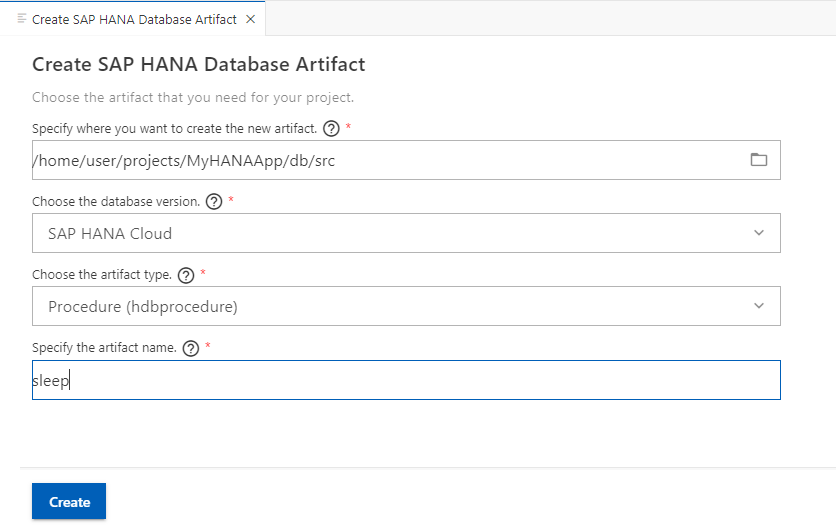
This is a very simple SAP HANA Stored Procedure that calls the built-in
SYNClibrary to put processing to sleep for 10 seconds. It's a nice tool to be able to test the impact of long running queries without actually putting unnecessary load on the system.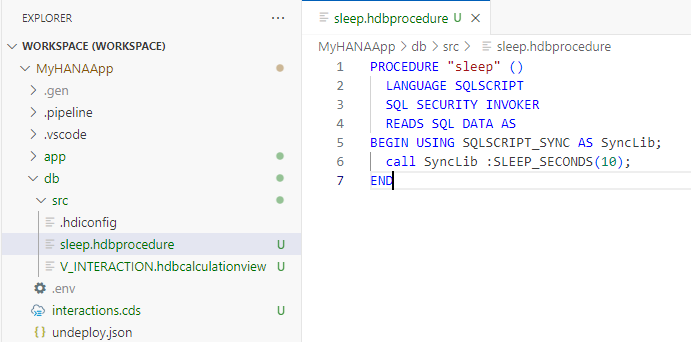 SQL
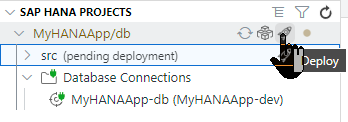
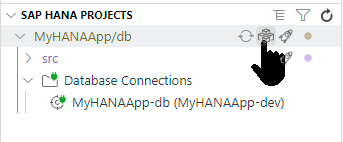
SQLPROCEDURE "sleep" ( ) LANGUAGE SQLSCRIPT SQL SECURITY INVOKER READS SQL DATA AS BEGIN USING SQLSCRIPT_SYNC as SyncLib; call SyncLib:SLEEP_SECONDS(10); ENDDeploy the to the database again using the SAP HANA Projects view.
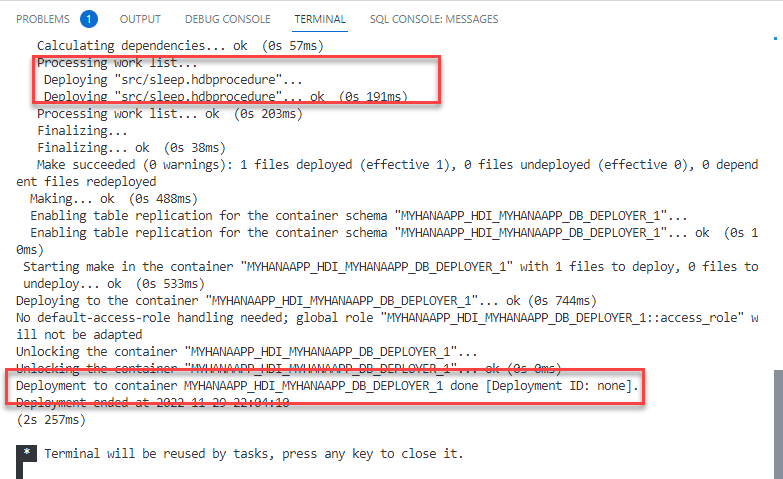
Check the deployment log to make sure everything was successfully created in the database.
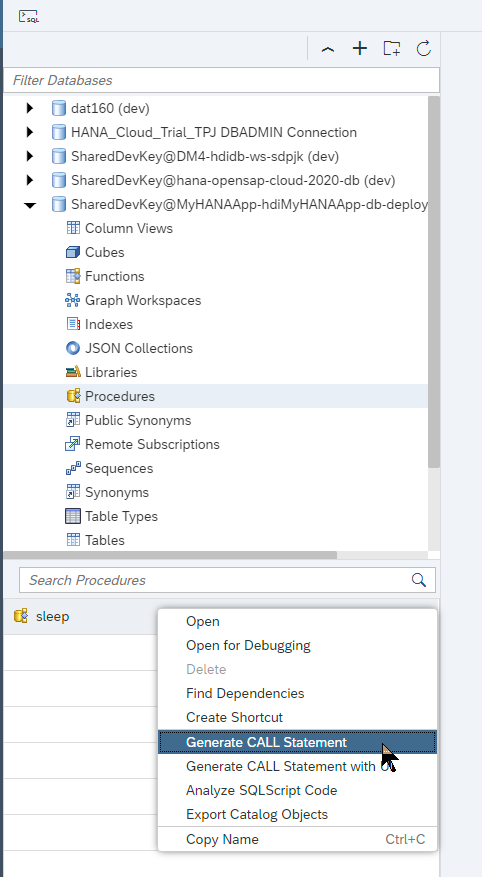
Open the HDI Container in the Database Explorer
This new Procedure is there now and can be tested.
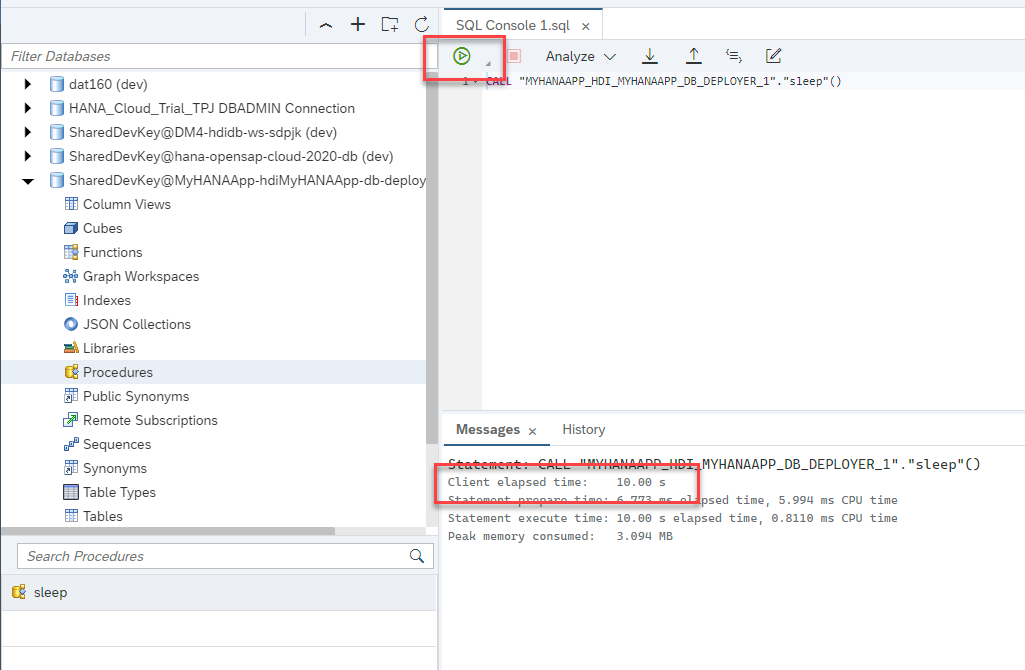
There isn't much output from the execution, but the 10 second wait makes testing quite easy.
Add procedure to CAP service
Now we want to add this Procedure to the CAP service as a function. Edit
/srv/interaction_srv.cds.Add:
function sleep() returns Boolean;to the service definition.This will expose an OData Function as part of the service interface.
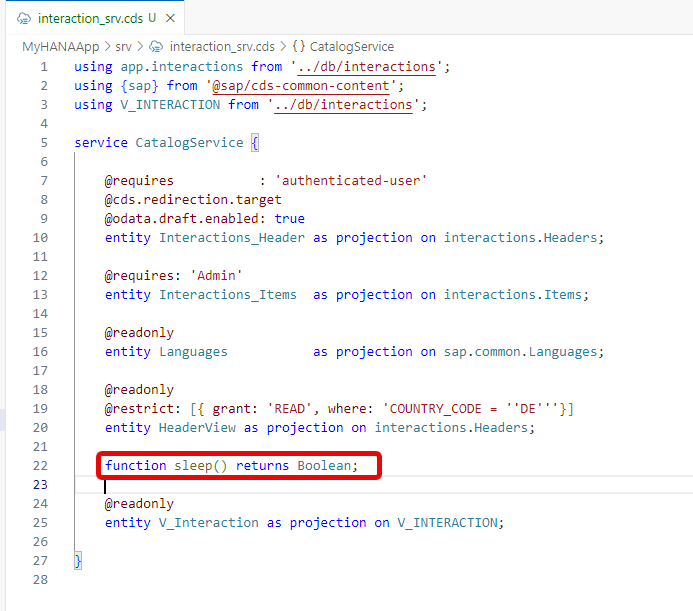
Just adding the function to the service definition doesn't implement it. Unlike tables and views which are implemented by the built-in handler classes of CAP, we need to use a service handler exit to implement this ourselves. In order to do this create a file named
interaction_srv.jsin the/srvfolder. The name must matchinteraction_srv.cdsjust with the different file extension for JavaScript. The matching naming tells CAP that you want to use this file to write custom exit handlers for the services defined ininteraction_srv.cds.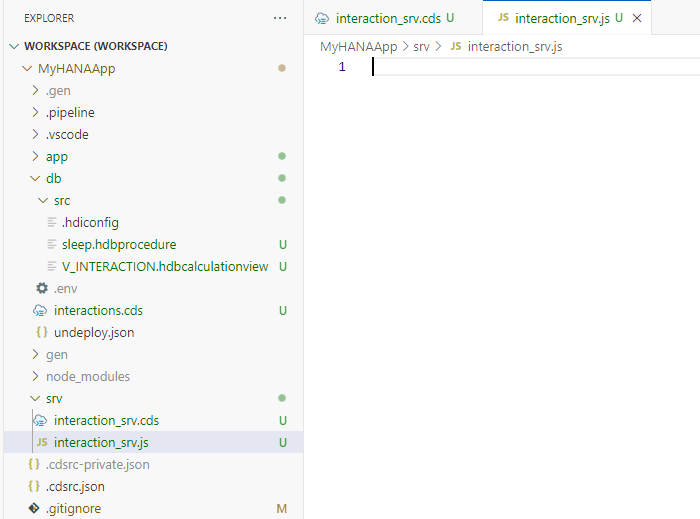
In
interaction_srv.jswe will implement the call to the Stored Procedure. This logic will implement the exit handler for this function which in turn uses the standardhdbNode.js module to call the Stored Procedure from SAP HANA Cloud. Save the file.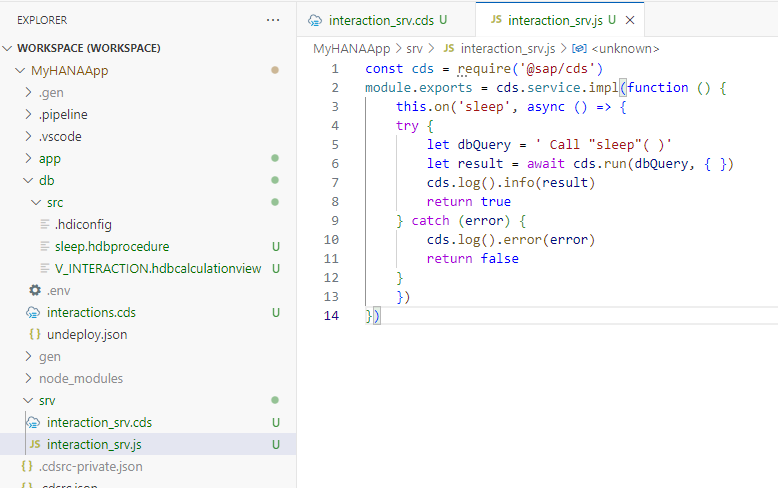 JavaScript
const cds = require('@sap/cds') module.exports = cds.service.impl(function () { this.on('sleep', async () => { try { let dbQuery = ' Call "sleep"( )' let result = await cds.run(dbQuery, { }) cds.log().info(result) return true } catch (error) { cds.log().error(error) return false } }) })From the console in the project root hopefully you still have the
cds watch ...running. Otherwise start it again withcds watch --profile hybridto start the CAP service layer for testing. If you have performed the tutorial SAP HANA Cloud, Add User Authentication to Your Application, remember you must also run the application router to test your service with authentication.The CAP preview UI doesn't list functions or actions, however. Manually add
/odata/v4/catalog/sleep()to the end of the URL. If it works correctly it should take 10 seconds to respond since the procedure is running a sleep operation for that long.
You've now added an OData function to your service layer which in turn is implemented as an SAP HANA Stored Procedure
Background
Stored procedures vs. entities
In Exercise 6 you exposed a Calculation View as a read-only OData entity set using the proxy entity pattern. A stored procedure is fundamentally different: it is a callable unit of logic with its own input/output parameters, not a tabular result set you page through with $top and $skip.
CAP models this distinction at the service definition level:
| Database artifact | CAP surface | OData surface |
|---|---|---|
| Table / Calculation View | Entity / Projection | Entity set (GET /Interactions_Header) |
| Stored procedure / function | CAP function or action | Function import (GET /sleep()) or action import (POST /sleep) |
CAP functions vs. actions
CAP's OData vocabulary distinguishes two kinds of callable operations:
- Function — read-only, has no side effects, addressed with HTTP
GET. Modelled with thefunctionkeyword in CDS. - Action — may modify state, addressed with HTTP
POST. Modelled with theactionkeyword in CDS.
The sleep procedure used in this exercise is declared as a function because it only reads data (the READS SQL DATA clause in SQLScript):
// srv/interaction_srv.cds
function sleep() returns Boolean;A write-heavy procedure — one that inserts or updates rows — would be declared as an action instead.
The .hdbprocedure artifact
Stored procedures that live inside your HDI container are defined in .hdbprocedure files under db/src/. The HDI deployer compiles these files into native HANA stored procedures during cds deploy.
The sleep procedure in this exercise looks like this:
-- db/src/sleep.hdbprocedure
PROCEDURE "sleep" ( )
   LANGUAGE SQLSCRIPT
   SQL SECURITY INVOKER
   READS SQL DATA AS
BEGIN USING SQLSCRIPT_SYNC as SyncLib;

call SyncLib:SLEEP_SECONDS(10);

ENDKey clauses:
LANGUAGE SQLSCRIPT— written in HANA's native procedural SQL dialectSQL SECURITY INVOKER— the procedure runs with the permissions of the calling user, not the procedure ownerREADS SQL DATA— declares the procedure as read-only (noINSERT/UPDATE/DELETE); required to use theSQLSCRIPT_SYNClibraryUSING SQLSCRIPT_SYNC as SyncLib— imports the built-in library that provides theSLEEP_SECONDSprocedure
Calling the stored procedure from CAP
Unlike entity-based access (where CAP generates and executes the SQL automatically), calling a stored procedure requires a custom handler in srv/interaction_srv.js. The handler uses cds.run() with a raw CALL statement:
// srv/interaction_srv.js
const cds = require('@sap/cds')
module.exports = cds.service.impl(function () {
    this.on('sleep', async () => {
    try {
        let dbQuery = ' Call "sleep"( )'
        let result = await cds.run(dbQuery, { })
        cds.log().info(result)
        return true
    } catch (error) {
        cds.log().error(error)
        return false
    }
    })
})cds.run() is the CAP-managed, driver-agnostic way to execute raw SQL or stored procedure calls against the bound database. It automatically uses the correct underlying driver (hdb, @sap/hana-client, or the SQLite shim in local development) without you needing to manage a connection or import a driver module directly. This is the recommended approach — using the hdb module directly would couple your code to a specific HANA client version.
Why no database redeployment is needed
When you added the Calculation View in Exercise 6, a redeployment was required because CAP had to generate and deploy a thin .hdbview SQL wrapper to make the view addressable by OData queries.
Functions and actions work differently. The service function declaration (function sleep() returns Boolean) registers the operation in the OData metadata document but does not create any new database object. The stored procedure itself was already deployed as part of the HDI artifacts in db/src/. CAP just needs to know it exists at the service layer — a restart of the CAP server is sufficient.
Summary
You have now wired a native HANA stored procedure into your CAP service as an OData function import. The key takeaways are:
- Stored procedures are exposed as CAP functions (read-only) or actions (stateful), not as entity sets
- The
.hdbprocedurefile indb/src/defines the HANA-side logic; the CDSfunctiondeclaration defines the service-side signature cds.run()provides a driver-agnostic way to call the procedure from the Node.js handler — no directhdbimport needed- No database redeployment is required when adding a function or action, only a server restart
Questions for Discussion
What's
SQLSCRIPT_SYNC?Answer
SQLSCRIPT_SYNCis a built-in SQLScript library that providesSLEEP_SECONDSandWAKEUP_CONNECTIONprocedures. Its purpose is to introduce a controlled pause inside a procedure without "busy waiting" (spinning a loop and consuming CPU doing nothing useful). Importing it withUSING SQLSCRIPT_SYNC AS SyncLiband callingSyncLib:SLEEP_SECONDS(10)makes the procedure pause for 10 seconds before returning.Why did we have to redeploy to the HANA database after adding the Calculation View in Exercise 6 but didn't need to after adding the Stored Procedure here?
Answer
The Calculation View proxy entity required CAP to generate and deploy a thin
.hdbviewSQL wrapper into the HDI container so that OData queries could reach the underlying Calculation View. That wrapper is a new database object — it requires acds deployto create it.The stored procedure, by contrast, is already present in the HDI container from the initial
db/src/deployment. Declaring it as a CAP function adds an entry to the OData metadata document and registers a handler, but creates nothing new in the database. Restarting the CAP server is enough.What's the difference between a function and an action?
Answer
Both are callable OData operations, but:
- Function — read-only, no side effects, called with HTTP
GET. Declared with thefunctionkeyword in CDS. - Action — may modify state (insert, update, delete), called with HTTP
POST. Declared with theactionkeyword in CDS.
The
sleepprocedure is a function because the underlying SQLScript usesREADS SQL DATA— it only reads, never writes.- Function — read-only, no side effects, called with HTTP
Why did we use
cds.run()instead of thehdbmodule directly to call the stored procedure?Answer
cds.run()is driver-agnostic: CAP selects the correct underlying database driver (hdb,@sap/hana-client, or the SQLite shim) at runtime based on the bound service. Your handler code stays identical regardless of which driver is configured.Using
hdbdirectly would hard-code a dependency on a specific client, require you to manage the connection lifecycle manually, and break in environments (such as local SQLite development) wherehdbis not available. See CAP: Driver-agnostic results for stored procedures for more detail.Try changing the
sleepCDS declaration fromfunctiontoaction. What changes in the OData metadata document, and what HTTP method would you use to call it?Answer
In the OData
$metadatadocument:- Before:
sleepappears as a<FunctionImport>element - After:
sleepappears as an<ActionImport>element
The HTTP method changes from
GETtoPOST. CallingGET /odata/v4/catalog/sleep()after the change will return an error — the runtime now expectsPOST /odata/v4/catalog/sleep.The underlying
sleep.hdbproceduredoes not need to change —READS SQL DATAis a database-level declaration about side effects, not an HTTP-level one. The CAP service definition is the only file to update.Use
function(GET) for read-only operations with no side effects. Useaction(POST) for operations that modify data, trigger a process, or have observable side effects — for example, a procedure that inserts an audit log entry or sends a notification.- Before:
The
sleepprocedure usesSQL SECURITY INVOKER. What is the difference betweenSQL SECURITY INVOKERandSQL SECURITY DEFINER, and why does it matter?Answer
SQL SECURITY INVOKER— the procedure runs with the permissions of the calling user. If the caller cannot read a table, the procedure cannot read it either.SQL SECURITY DEFINER— the procedure runs with the permissions of the procedure owner (typically the HDI container's technical user / schema owner), regardless of who calls it.
For the
sleepprocedure,INVOKERis appropriate: the procedure only calls a library function and reads no business data, so there is no reason to elevate the caller's privileges.DEFINERis used when a procedure legitimately needs to access objects the calling user cannot reach directly — for example, a reporting procedure that aggregates data from a restricted audit table. However,DEFINERintroduces a privilege escalation risk: a caller can do things through the procedure that they could not do directly. SAP recommends defaulting toINVOKERand only switching toDEFINERwhen there is a clear, justified need.
Further Study
- CAP - Using Native SAP HANA Artifacts — proxy entities, user-defined functions, and stored procedures in CAP
- CAP - Actions and Functions — how to define and implement OData operations
- SAP HANA Cloud SQLScript Reference — full SQLScript language reference
- SQLSCRIPT_SYNC library —
SLEEP_SECONDSandWAKEUP_CONNECTIONreference - SAP Tech Bytes: HANA Client Tools for JavaScript (Part 4) — comparison of
hdb,@sap/hana-client, and CAP-managed database access
Next
Continue to 👉 Exercise 8 - Deploy CAP with SAP HANA Cloud project as MTA